
1 agents
Agents
Every session, project, model, status, and the last thing it did. See who is working, who is waiting, and which session actually needs you.
status · model · tokens · current task · enter to inspect
Agenturm is a terminal-first monitor for the agents already running on your machine. Watch Codex, Claude Code, OpenCode, and any OpenTelemetry agent in one keyboard-driven cockpit — sessions, prompts, MCP calls, traces, tokens, and errors. Everything lands in local SQLite.
curl -fsSL https://www.agenturm.dev/install.sh | bash Switch with 1–7. Every row links back to the same session, trace, and tool call, so an error in one pane is one keystroke from its evidence in another.
Every session, project, model, status, and the last thing it did. See who is working, who is waiting, and which session actually needs you.
Prompts, assistant messages, shell commands, file changes, browser actions, and errors — in the order it happened.
Which server, which tool, what went in, what came back. Failures and durations stay attached to the execution that produced them.
Parent/child operations, model usage, durations, and errors. Follow a failing tool call outward until the run makes sense.
Known local agent processes, state, RAM, and cumulative CPU on Linux. Process inventory is reported separately from session counts.
OTLP metrics and resource usage as recorded. Token totals reflect emitted telemetry; costs stay unknown when the producer never reports them.
A searchable review queue with occurrence counts, evidence links, and direct navigation to the source trace. Approvals stay hidden by default.
Real terminal renders from the repository. The records are synthetic; the interface, layout, and keyboard model are exactly what ships.
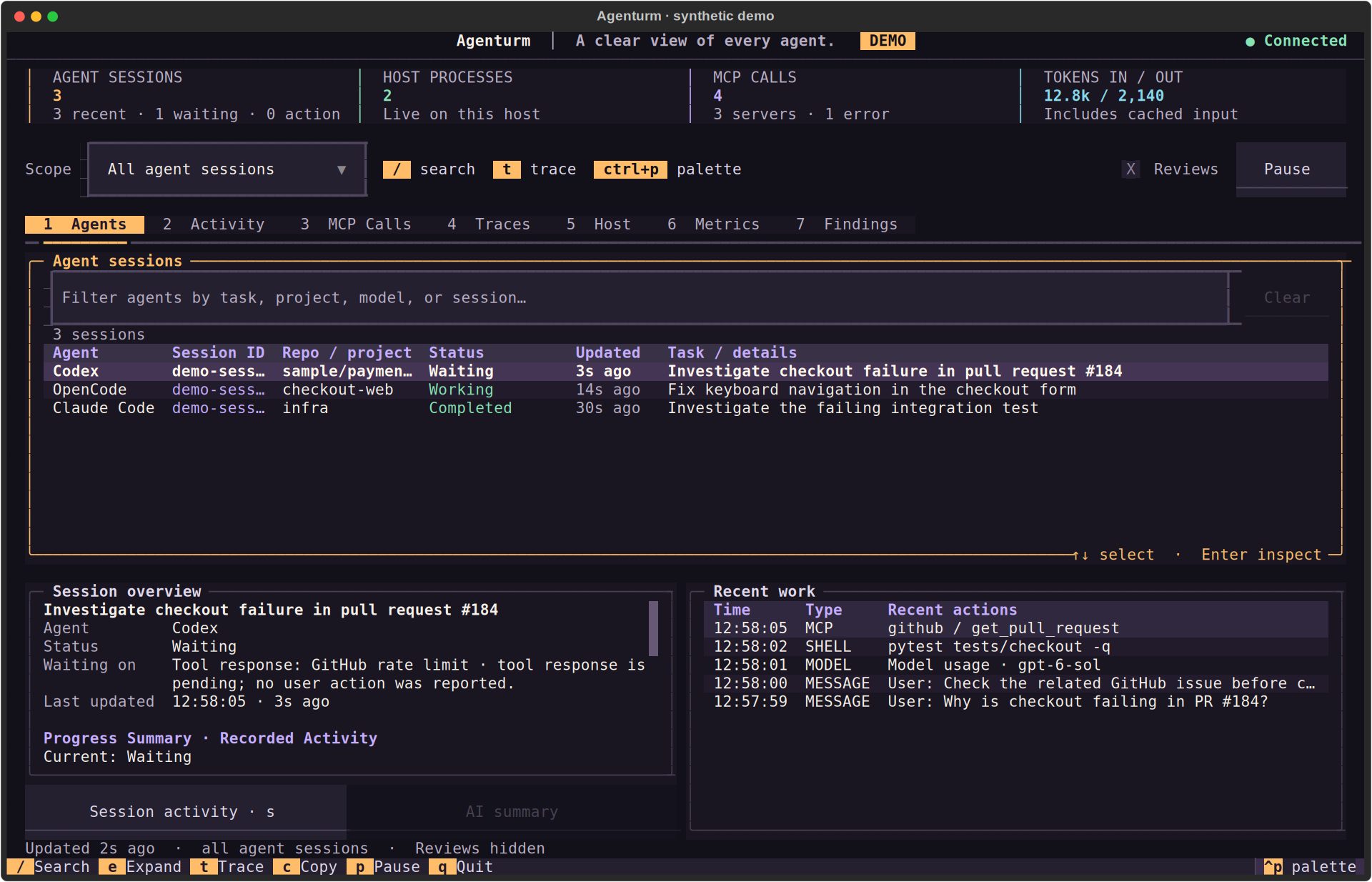
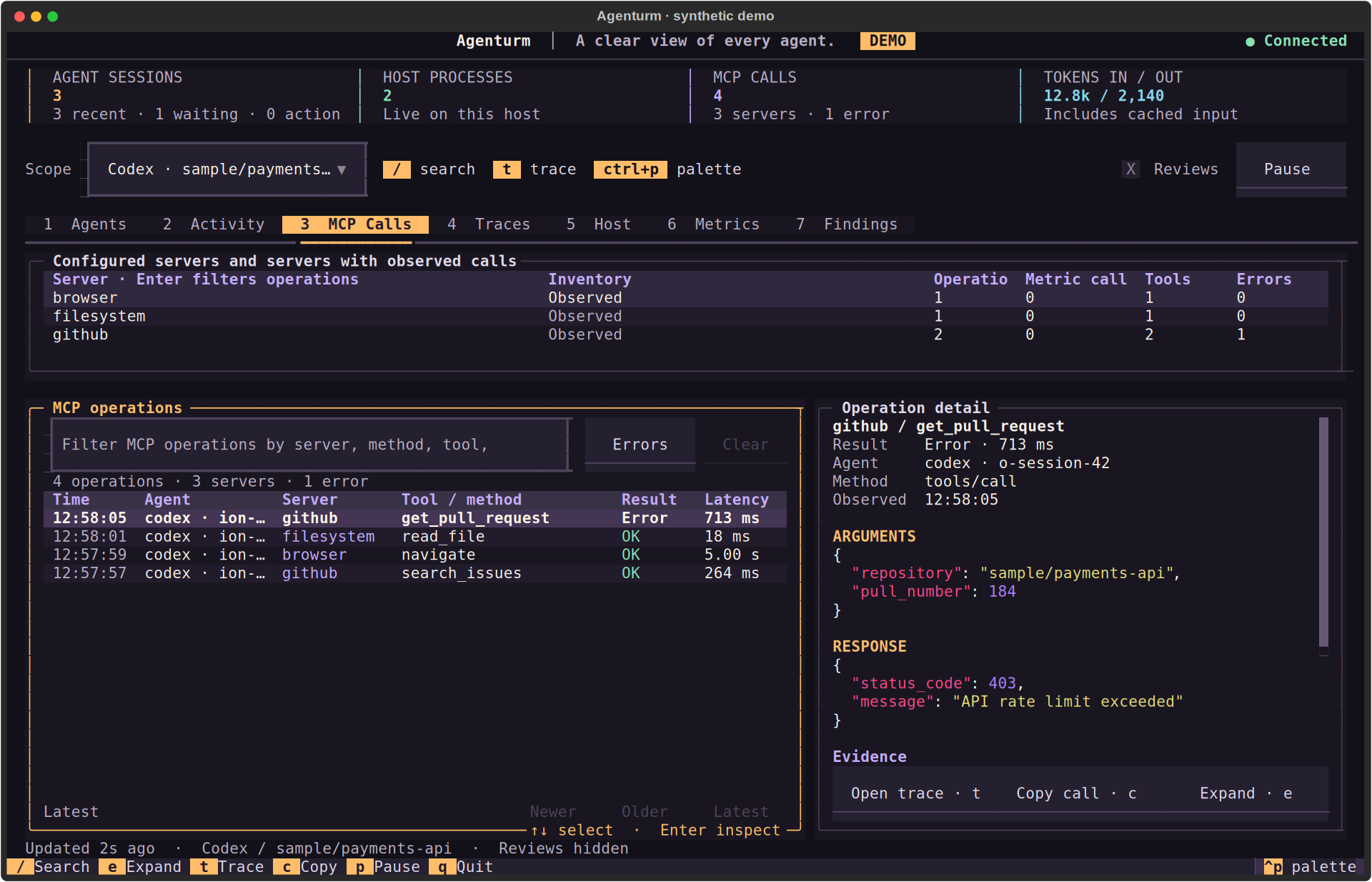
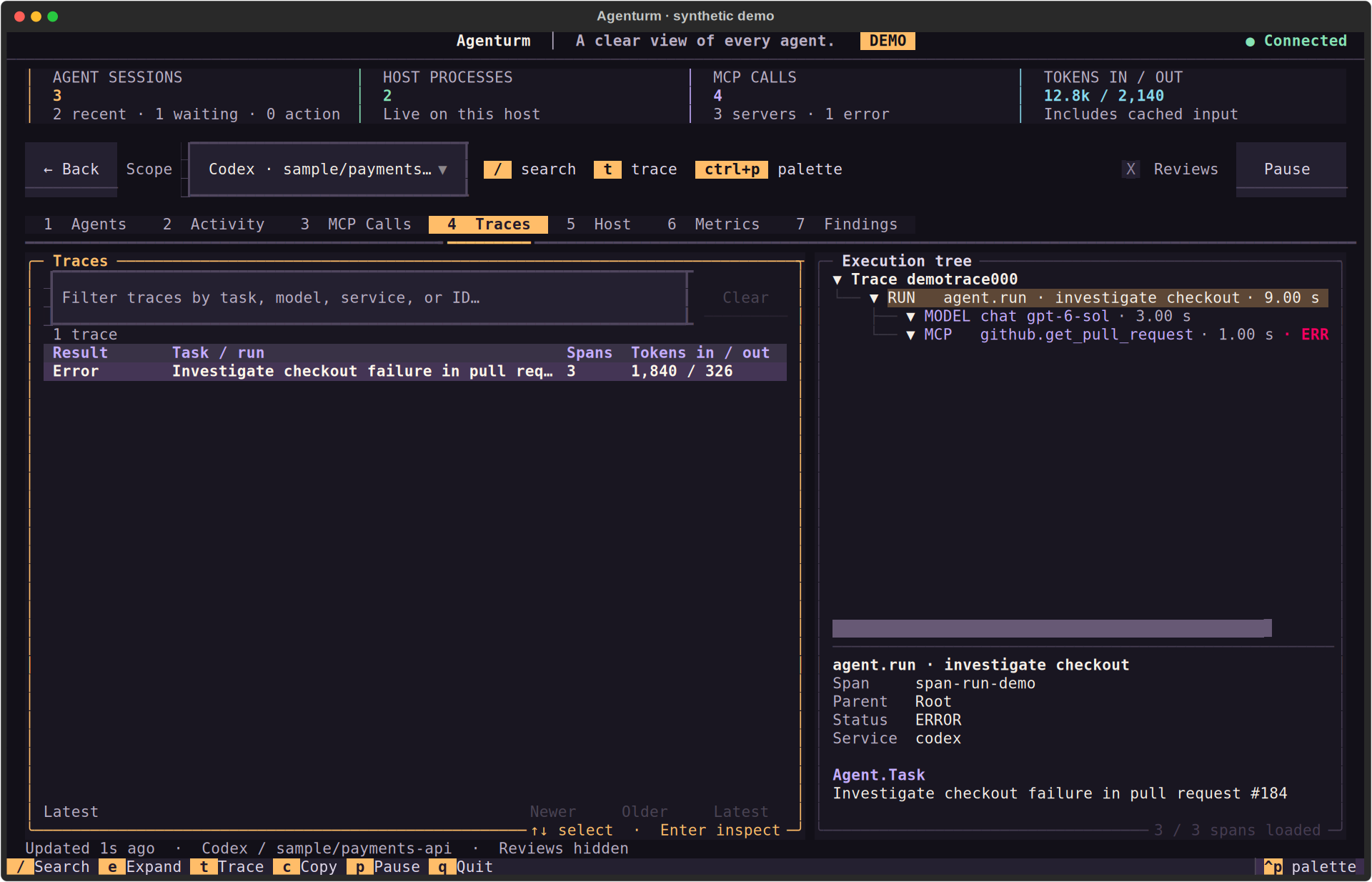
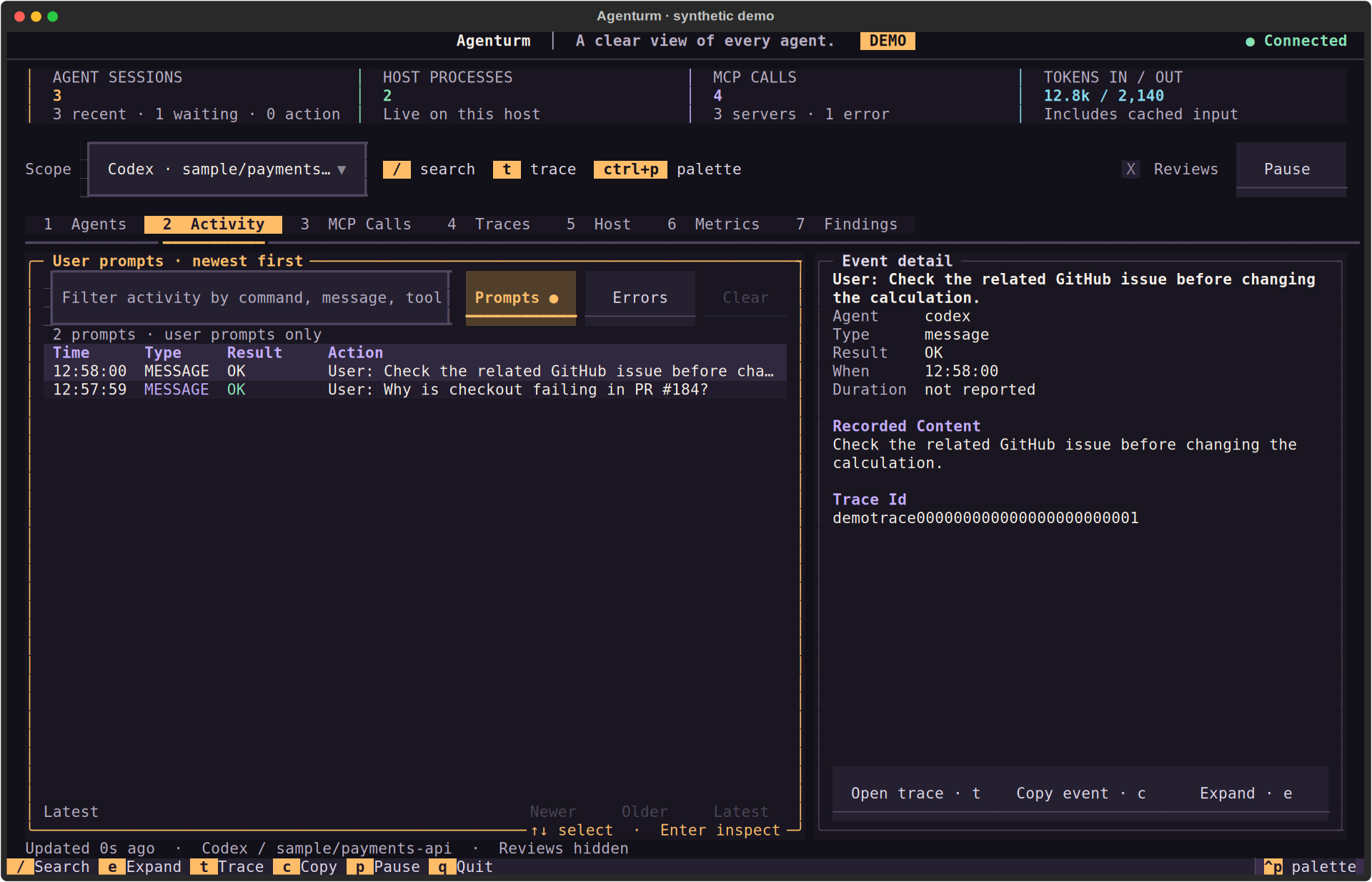
Documentation screenshots use synthetic example records. Your terminal shows what your local logs or telemetry actually contain — including the gaps.
Agenturm observes what your agents already record, plus whatever telemetry you choose to emit. It does not attach to arbitrary processes or invent missing actions.
On a loopback receiver, recent Codex and Claude Code session files are discovered and tailed as they change. OpenCode's local database is opened read-only.
A local receiver accepts OTLP/HTTP traces, logs, and metrics. Content is bounded, recognizable credentials are redacted best-effort, and metadata-only mode can drop text entirely.
The Textual cockpit refreshes live data every two seconds. Sessions, MCP calls, traces, host, metrics, and findings stay linked by the same recorded evidence.
127.0.0.1 by default. It is not an internet-facing
collector: remote access needs authentication, TLS, and a trusted reverse proxy.
Python 3.11+ and uv. No account, no API key, and no browser tab required for local monitoring. Start it wherever you already work.
recommendeddownloads the installer and installs the latest CLI with uv
runs immediately without installing the command
installed onceadds the agenturm command to your shell
works inside an existing virtualenvPython 3.11+
for hacking on the cockpitcontributing guide ↗
There is no PyPI release yet. Install from the repository with
uvx or uv tool. The Python import, settings, and
database names stay compatible with the old Agent Observatory name.
No mouse miles. No dashboard builder. The full key map ships in the footer of the terminal, and the command palette exposes the rest.
Alpine Ember is the default. Bright, Dark, and Solarized apply across panels, tables, controls, and evidence text. This page listens too — click a card.
Site preview uses the same palette names and spirit as the terminal. The terminal's default
theme is Alpine Ember; press ⌃P → Theme to switch there. Your choice here is stored
in localStorage, nowhere else.
The interesting data is your prompts, commands, diffs, and MCP arguments. Treat it like source code — because it usually contains some.
Your agent logs never leave the box.
Session records and telemetry stay in SQLite on the host running the receiver. No account. No cloud sync. No telemetry about the telemetry.
127.0.0.1 → sqlite
The receiver binds to 127.0.0.1:14318 by default. Remote access needs
authentication, TLS, and a trusted reverse proxy; it is not multiuser software.
Recognizable credentials and selected sensitive structured fields are redacted before storage. Private reasoning, encrypted reasoning, binary payloads, and process environments are excluded — but upstream schemas can leave gaps.
agenturm serve --metadata-only omits native session text, commands,
and outputs for new ingestion. It does not erase content already stored.
Recorded-progress summaries work immediately and offline. Optional provider-backed
summaries reuse OPENAI_API_KEY and run only when you request them.
Pressing x opens a privacy preview; no file is written until you confirm. Exports are not an additional redaction pass and contain loaded evidence.
→ Read the full capture and privacy boundaries ↗. If you need a guarantee, read the code and the boundaries — not a marketing badge.
Native discovery where the logs exist, OTLP where they don't. The UI shows what the producer actually recorded — no inference, no fabricated tool calls.
export OTEL_EXPORTER_OTLP_ENDPOINT=http://127.0.0.1:14318
export OTEL_EXPORTER_OTLP_PROTOCOL=http/protobuf
For SDK capture, framework adapters, and framework-specific setup, read the framework guide ↗. The companion SpanHound investigates trace files through MCP when you want to ask questions instead of scroll.
If something is still unclear, the source, docs, and issue tracker are one click away. Small reproductions are welcome.
No. Agenturm is a terminal UI plus a local OTLP/HTTP receiver. Records live in SQLite on the host running it. No browser, account, or API key is needed for local monitoring.
Not by default. Session text and telemetry stay local. Optional AI summaries reuse an existing OPENAI_API_KEY and run only when requested; that path sends documented session evidence to the provider. See the privacy boundaries before enabling it.
No. When a session asks for a reply or approval, Agenturm shows the wait and points you to that agent's own terminal. It does not submit answers or approve actions on the agent's behalf — that boundary is deliberate.
On loopback, recent Codex and Claude Code session records are discovered automatically, and OpenCode's local database is read-only discovered. Gemini CLI, Copilot CLI, Cursor Enterprise, and any OTLP-capable agent send telemetry to 127.0.0.1:14318.
Not as of v0.1.3. Install directly from the repository with uvx or uv tool — the commands above are the supported path. The Python import, settings, and database names remain compatible with the older Agent Observatory name.
Yes. The terminal UI is Textual, and the repository includes a PowerShell installer. Python 3.11+ and uv are the only runtime requirements. Exact terminal support depends on your terminal emulator.
Agenturm is MIT-licensed and free. Optional provider-backed summaries use your own API key, so provider usage may cost money — but local discovery, the receiver, and the cockpit do not.
It borrows the silhouette of Berlin's TV Tower: a spherical observation deck above a slim mast. The mark is a vantage point over agent activity, not control of the agents. The default palette is called Alpine Ember.
One command. Then open the terminal where you actually work. Local records, live evidence, and a keyboard-first way to find the failure.
curl -fsSL https://www.agenturm.dev/install.sh | bash